
DRPrint
Accurate ICC target printing without the usual mistakes.
DRPrint is a simple desktop app created for one job: printing ICC profile target images at the correct physical size, without accidental scaling, unwanted embedded profile handling, or confusing print setup errors.
When creating printer ICC profiles, the target must be printed exactly as intended. A small scaling mistake, an embedded ICC profile, or an incorrect paper setup can invalidate the measurement and waste paper, ink, and time. DRPrint reduces these risks by giving you a focused print workflow built specifically for profiling targets.
Built for ICC profiling targets
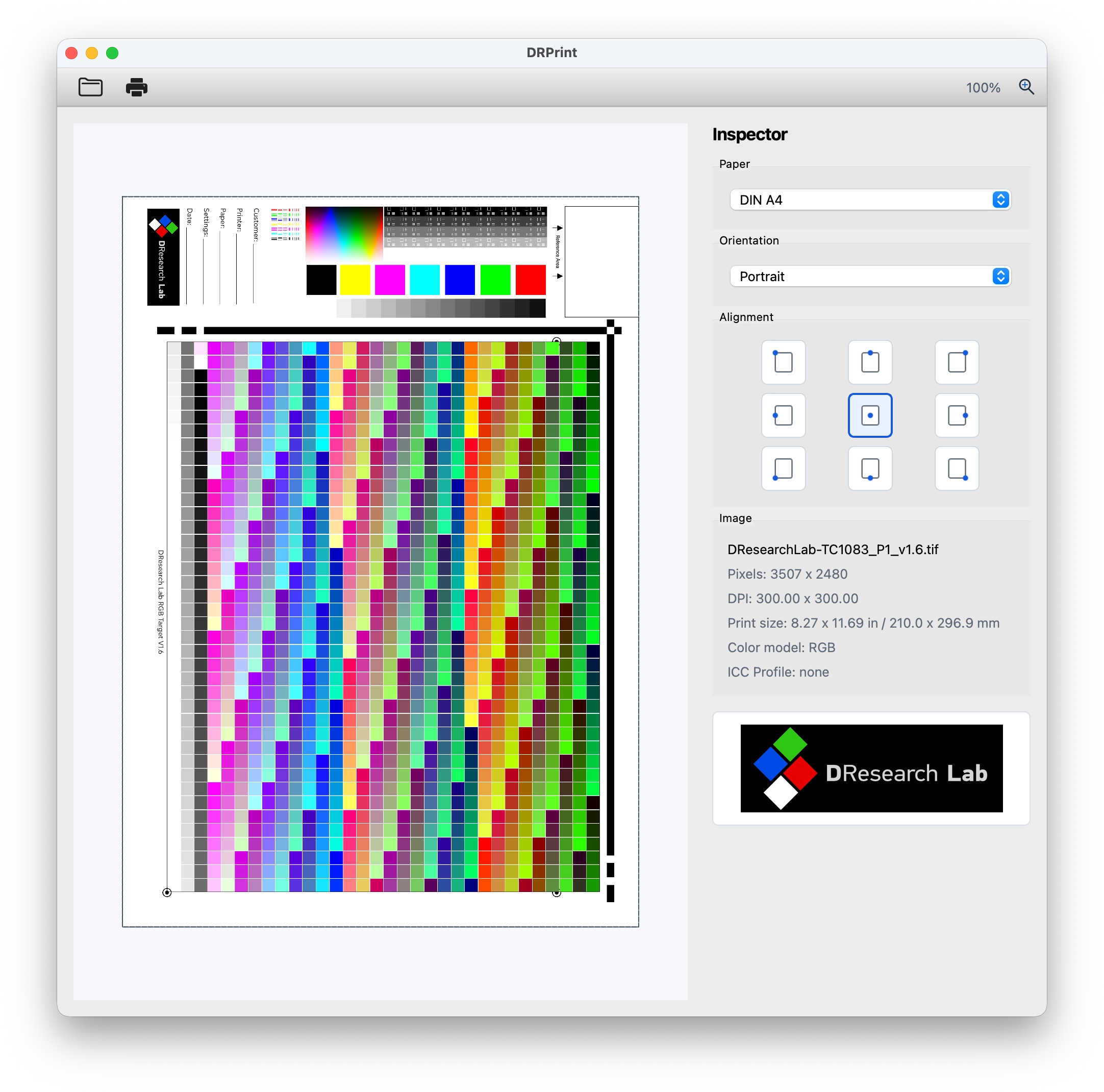
DRPrint reads the target image, detects its pixel dimensions, DPI, color model, print size, and whether an ICC profile is embedded. The app prints the image at 100% physical size based on the file’s own DPI metadata, with no application-side scaling controls that can accidentally resize the target.
If an embedded ICC profile is found, DRPrint warns you before printing and ignores the embedded profile for profiling output.
Simple, controlled printing
Load a TIFF, JPEG, or PNG target image, check the file information, choose the paper size and alignment, then print. DRPrint automatically selects the most suitable paper size and orientation for the target, while still allowing manual control when needed.
Supported paper presets include DIN A4, A3, A3+, and A2, with portrait and landscape orientation. A 9-point alignment control lets you place the target on the page precisely.
Key Features
- Prints ICC target images at true 100% physical size
- Prevents accidental application-side scaling
- Detects embedded ICC profiles and warns before printing
- Ignores embedded profiles for profiling target output
- Displays pixels, DPI, physical print size, color model, and ICC status
- Supports TIFF, JPEG, and PNG target files
- Supports RGB, grayscale, and CMYK target images
- Automatic paper and orientation selection
- Manual A4, A3, A3+, and A2 paper selection
- 9-point target alignment on the page
- Zoomable print preview with drag-and-drop loading
- Warns if the target is larger than the selected paper and will be cropped
- Works with any printer installed through the operating system
- Native desktop app for macOS and Windows
Platform Support
Windows
Windows 10 version 1809 or newer, 64-bit
macOS
macOS 13 Ventura or newer
Intel and Apple Silicon supported
Download 7 Days Full Trial:
sha-256 hash: b9127b22d4c74ff234151bfb138a50caee7968e2731d9065461237a143e2cdda
sha-256 hash: 2fa6b105dd01d332c84fe170905ae65255e28fe997e5dc51ef0ed561ae9b998c